A survey that ends in measures.
The survey is the start. The results show what drags things down, the comments explain why, and the next survey shows whether the measures worked. Ready in 20 minutes – with or without an HR system.
The year wheel runs itself
One main survey a year sets the baseline. The pulses in between measure only what you have put measures on – three statements per factor. Empvibe sends out, reminds and notifies for you.
- Baseline: 37 questions, all employees, once a year
- Pulse: three statements from each factor with open measures
- A factor drops out of the pulse once its measures are closed
- Add a pulse to any month directly in the year wheel
- Jan
- Feb
- MarPulse
- Apr
- May
- JunPulse
- JulHoliday
- Aug
- SepMain
- Oct
- Nov
- DecPulse
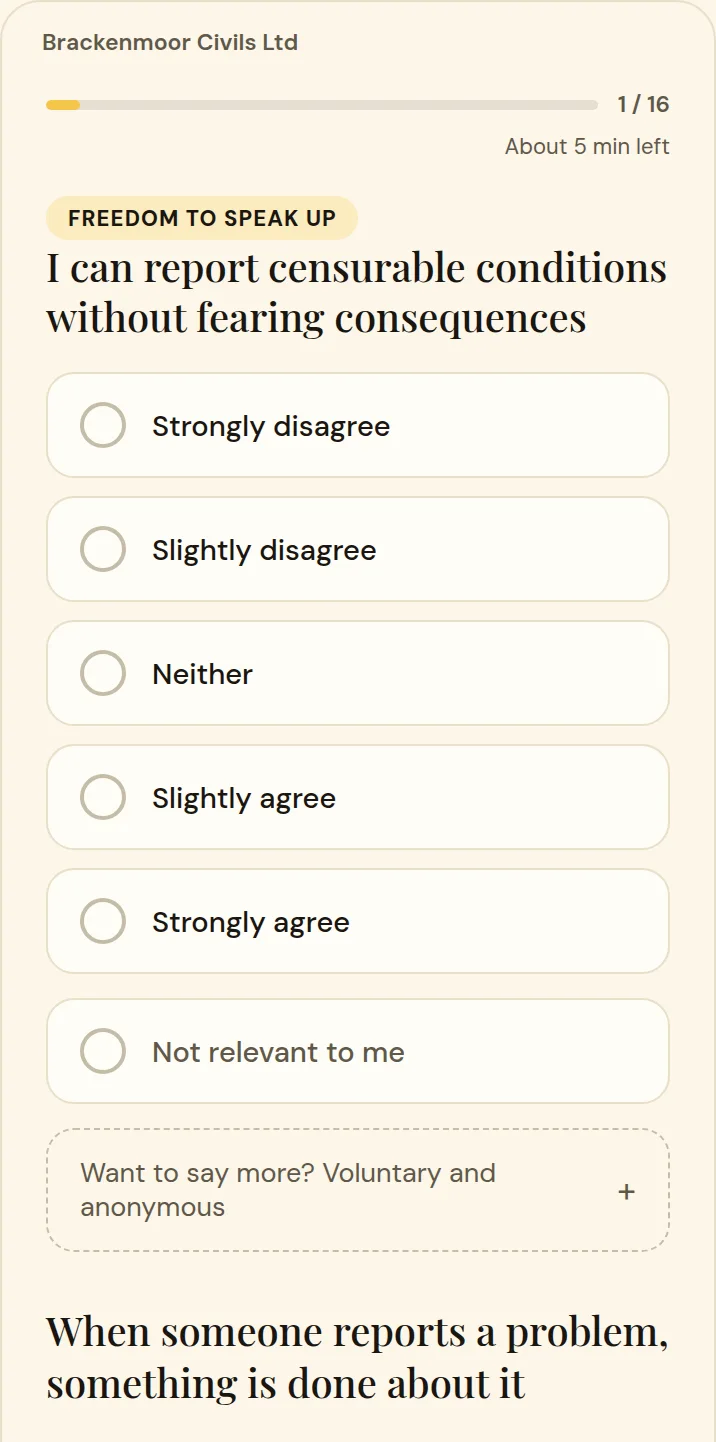
Four minutes, on the phone, during a break
One topic at a time, the factor visible, comments optional – and any question can be skipped. The statements on the eleven factors come in a random order for each person, so no one can guess who answered what from when the answer came in; HSE’s Indicator Tool keeps HSE’s own order.
- We never store a name, e-mail or IP address with the answer
- Managers see figures only once at least 5 have answered
- Optional module: HSE’s Management Standards Indicator Tool, 35 statements, added unchanged. Contains public sector information published by the Health and Safety Executive and licensed under the Open Government Licence
- Invitation by e-mail, or a QR code on the noticeboard for those without a screen at work
Sorted by what matters most – not by the lowest score
Factors with an index from 0 to 100, the change since last year and the risk level. Tap a factor to see the statements behind the figure, the answer distribution and three suggested measures.
- Heat map, priority, segment profile and trend – the same figures, four questions
- Groups below the limit show as «—», administrators included
- Factors are mapped onto HSE’s Management Standards areas, in the record and on each measure – the mapping is Empvibe’s own
- 41Freedom to speak upHSE: Relationships · −7 since last yearHigh
- 44WorkloadHSE: Demands · −9High
- 52Conflicting demandsHSE: Role · −6Medium
- 64Support from managerHSE: Support · −5Medium
- 71Role clarityHSE: Role · −2Low
An anonymous conversation, not an inbox
Empvibe sorts the free-text answers by factor and tone. The manager replies without knowing who wrote, and the employee reads the reply through their private link.
- Grouped by factor, with the tone taken from the answer the comment belongs to
- The reply reaches the person who wrote – without anyone knowing who
- A factor is shown only once at least 5 have answered
- "There's no point speaking up. We reported a problem with the rigging in the spring and never heard back."Freedom to speak up · waiting · 6 daysNegative
- "Changing the morning meeting was a good move."Meaning and recognition · you replied: Good to hear – we'll keep it up.Positive
From finding to effect, with an owner and a deadline
Every factor has three ready-made, research-based suggestions: a routine, a workshop or a leadership practice. Each one says how long it takes and which statement measures the effect.
- Six stages: suggested, decided, in progress, done, effect measured, closed
- An owner and a deadline on every measure
- The effect is measured on the same statement in the next pulse
- Reply to every report within five daysRoutine · ongoingAdd to plan
- Workshop: What stops us speaking up?Workshop · 90 minAdd to plan
- The manager asks first and speaks lastLeadership practice · every meetingAdd to plan
The written record of your risk assessment, for management or an inspector
Empvibe drafts it from the figures: the significant findings and any group especially at risk (MHSWR 1999 reg 3(6)), and the measures, with owner, deadline and follow-up. Choose the year, scope and recipient. You read it and approve it – nothing goes out automatically.
- Legal basis: MHSWR 1999 regs 3 and 5 in Great Britain, MHSWR (NI) 2000 in Northern Ireland
- Consultation with representatives, or with employees directly, is on record
- Save as PDF – the data is yours
- Method and participationInstrument · response rate · threshold
- SurveyWhat is going well, what drags things down
- 4Risk assessmentMHSWR 1999 reg 3 · likelihood and consequence
- 5Measures4 measures · 1 effect measured
No one sees who answered
Your role decides what you see. No one sees individual answers, and the threshold – at least 5 answers – applies to administrators too. The simple view gives one page; the full view gives every analysis.
- The managing director (or owner) sees the whole organisation and every comment
- The department manager sees their own team once enough have answered
- The health and safety representative, where you have one, sees the same figures and the risk assessment
- Managing directorWhole organisation · all comments · sets owner and deadline1 day before
- Department managerOwn team · own comments and measures1 day before
- Health and safety representativeWhole organisation · risk assessment and legal basis2 days before
Ready in 20 minutes, with or without an HR system
Enter your Companies House company number and your company name. Paste in your staff, upload a CSV or import them from Microsoft Entra ID – Empvibe keeps the list up to date.
- A 9-step wizard from your organisation to the first send-out
- Small groups are not shown, but they count towards the total
- Data in the EU, and you sign the data processing agreement in the app
- Microsoft Entra ID sign-inSign in with your Microsoft work accountReady
- CSV, a list or Entra IDGroup and role in the table, or fetched from MicrosoftReady
- E-mail, QR code, Teams and SlackThe link arrives where people actually readReady
- HR and payroll systemsNot connected yet – tell us what you useNot yet
Start with your own organisation
Enter your company’s name to sign up. No consultant and no kick-off meeting.